For quantity surveyors
BOQ and measurement book software for quantity surveyors
NepalConstruct gives a quantity surveyor the BOQ with rates built from district rates and DUDBC or DoR norms, the bid eligibility check, and the measurement book of each contract. Every measurement is checked against the quantities in the site's daily reports, and it counts toward a bill only after a second person acknowledges it. All of it runs on the web.
- Web app
- Nepali and English
- Works on
- WebThe measurement book is in the web app only
- Prepares
- BOQ, rate analysis, MB entriesAnd variation orders
- Checks
- DPR against MBA gap shows in amber
- Hands work to
- Accountant, project managerWho raise and recommend the bill
Which screens does a quantity surveyor use?
All on the web, with the same BOQ from estimate to bill.
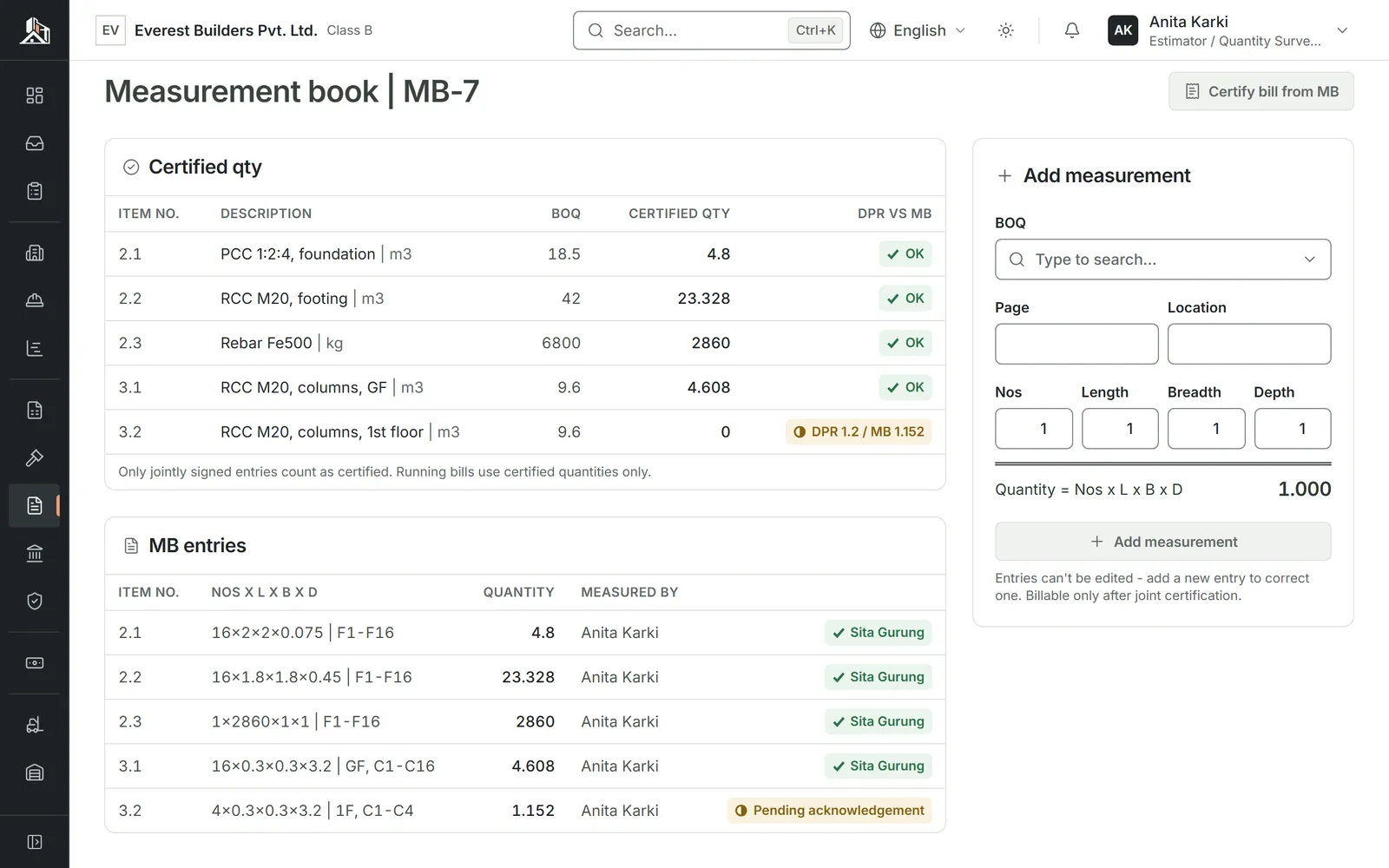
Certified quantity against the BOQ, the DPR vs MB check, and each entry with who measured it and who acknowledged it.
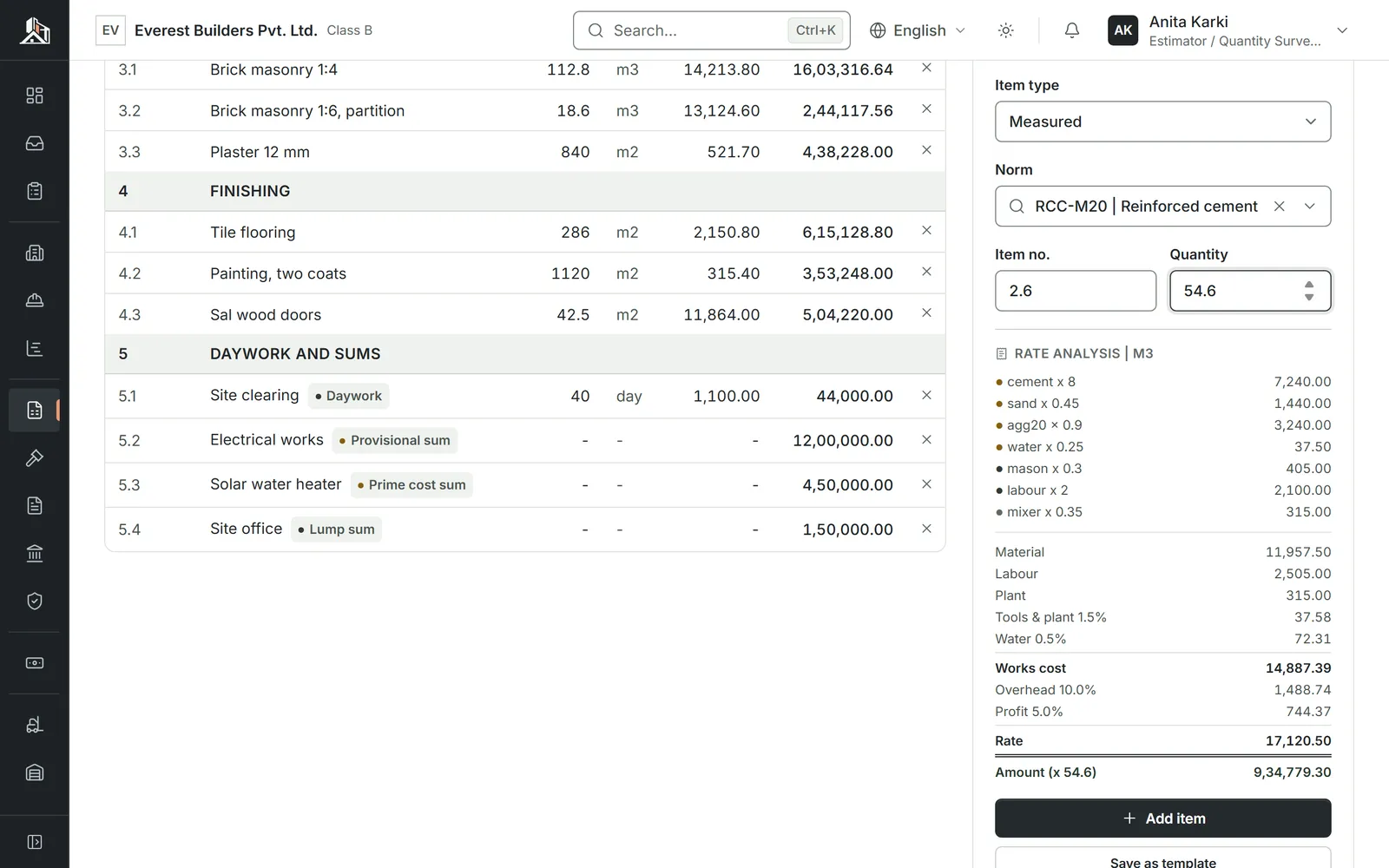
Pick a norm and see the rate from material, labour and plant up to overhead and profit, before the item goes in.
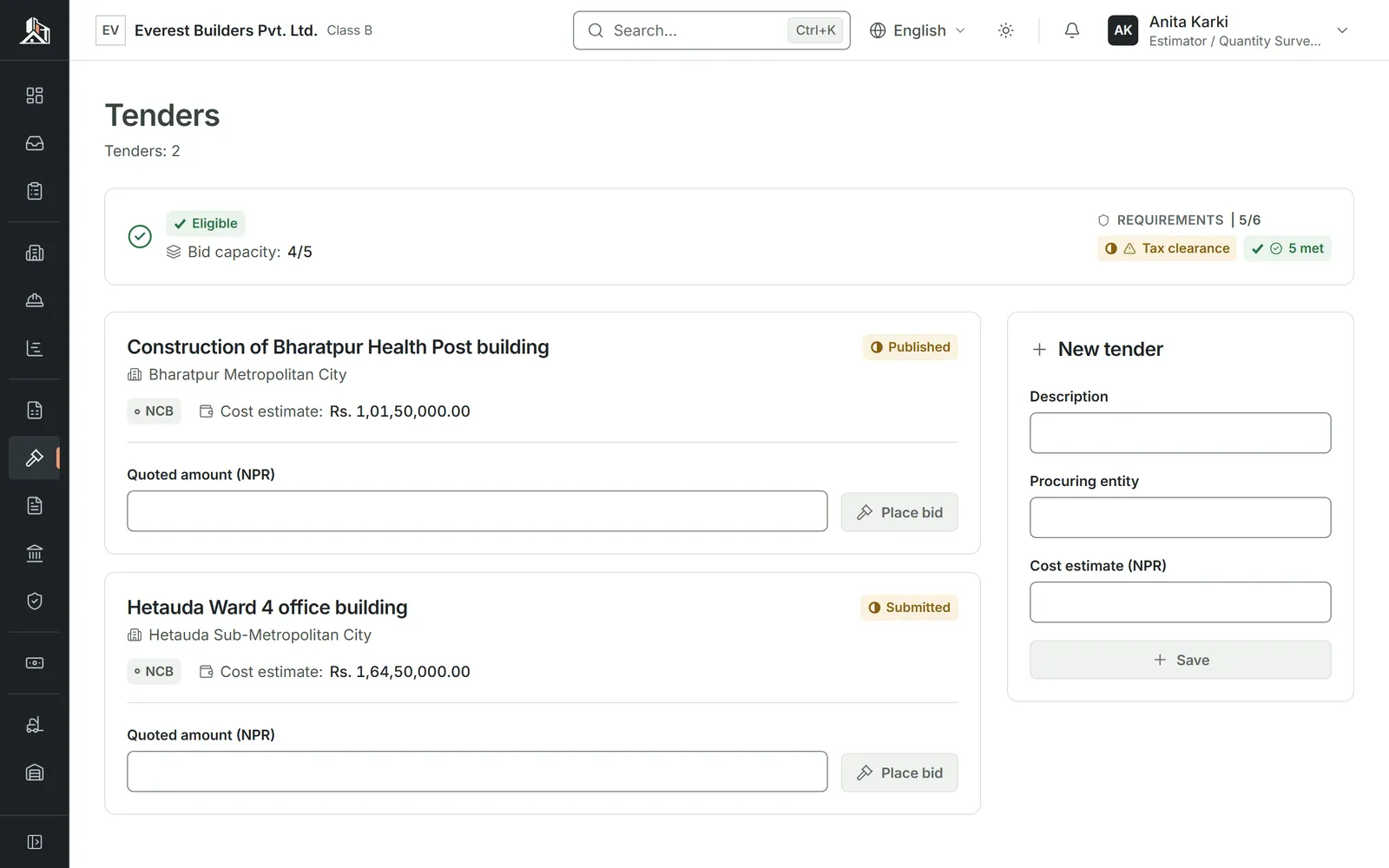
The eligibility banner, the requirements still open and the active project count, above each tender.
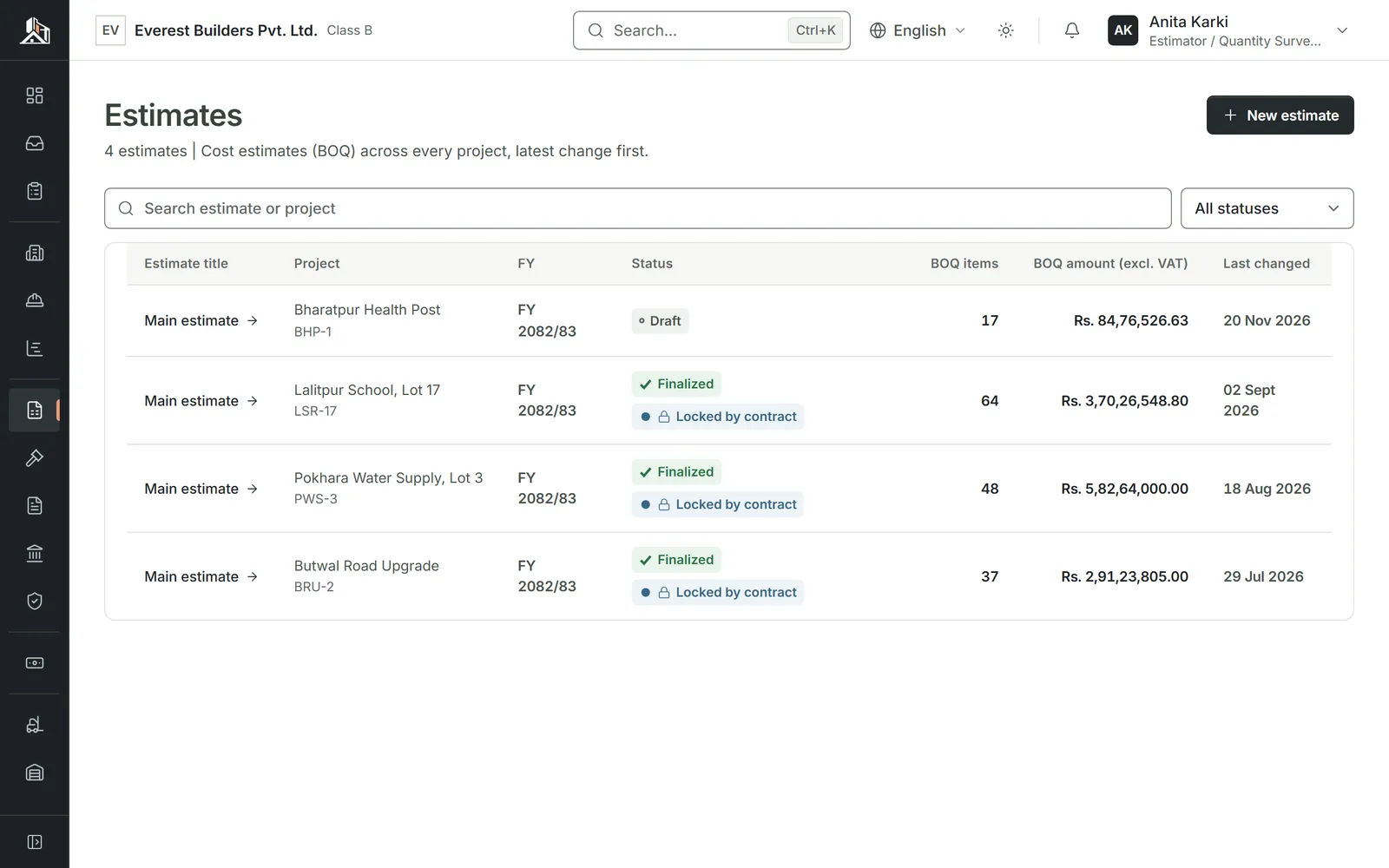
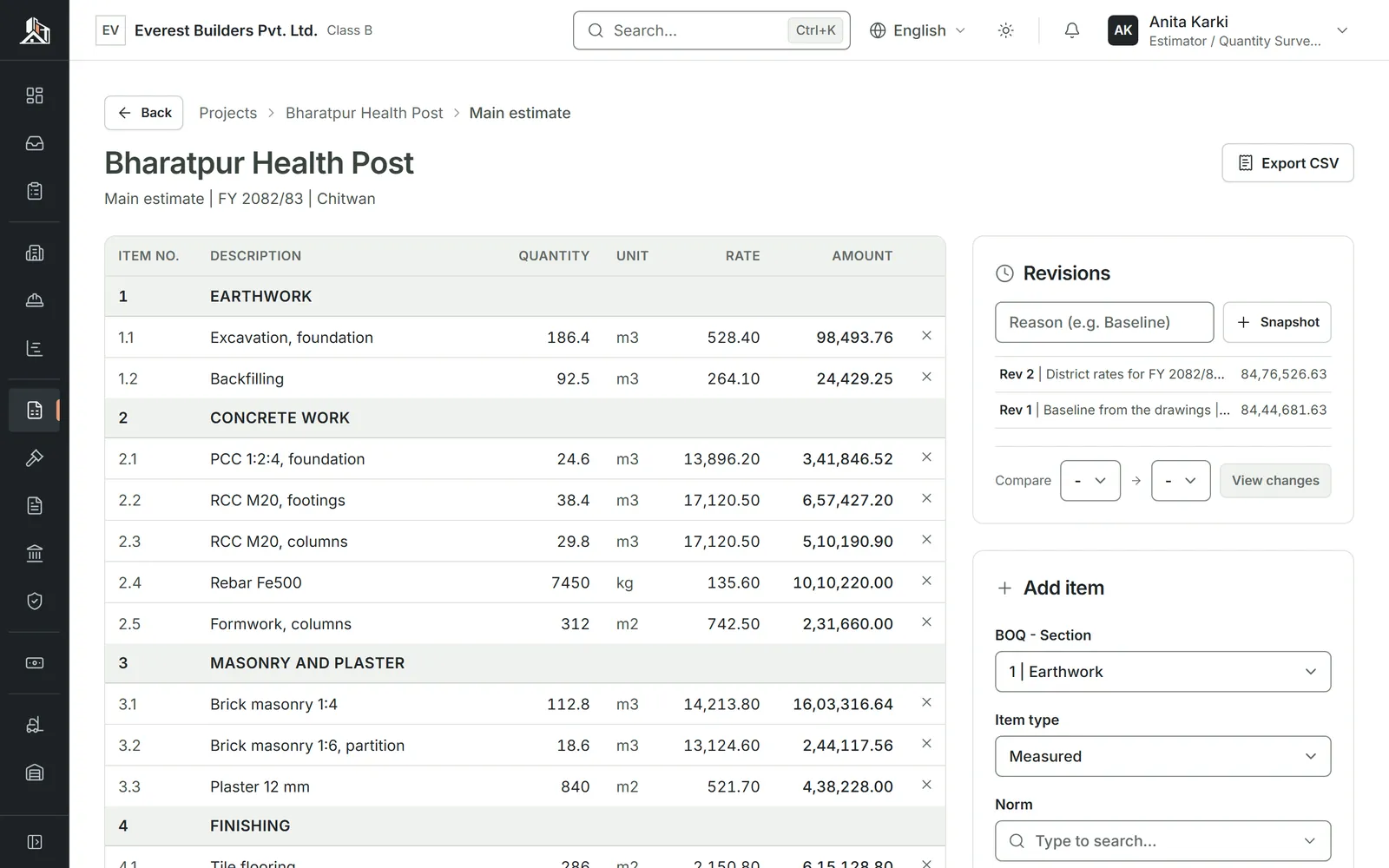
Every estimate across projects, with its BOQ amount. Once a contract is awarded, its BOQ is locked.
What does a quantity surveyor's day look like?
From pricing the BOQ in the morning to the measurement book in the afternoon, all on the web.

Price BOQ items
Pick a norm for an item and the rate builds up in front of you: material, labour and plant from the district rates, then overhead and profit from the firm's dated settings. If a rate the norm needs is missing, the estimate stops instead of using zero.
Estimates & tendersCheck bid readiness
The tenders page checks the firm's licence, PAN, VAT, tax clearance, e-GP registration and NEC engineers, and counts active projects against the limit. A red check blocks the bid.
Estimates & tendersEnter measurements in the MB
Enter each measurement against a BOQ item as Nos x L x B x D; the quantity works itself out. Entries cannot be edited or deleted, and the DPR vs MB column shows where the site's daily reports and your measurements differ.
Measurement & billingPrice a variation
Extra work goes on a variation order with its items, quantities and rates. The contract shows the running variation percentage, and when someone with billing rights approves the order, the approval level it needed is recorded.
Measurement & billing
Where does a quantity surveyor's work go next?
A quantity surveyor prepares and measures, and someone else signs. Nobody can acknowledge their own measurement or approve a variation order they raised.
What a quantity surveyor prepares, and where it goes next
- Measurement book entryYour stepMeasures it as Nos x L x B x DThenCounts only once another person with billing rights acknowledges it
- Running bill (IPC)Your stepSupplies the acknowledged quantitiesThenRaised from the MB by someone with billing rights, recommended by the PM, approved by a senior manager
- Variation orderYour stepCreates and prices itThenSomeone with billing rights approves it and the level it needed is recorded
- Estimate and BOQYour stepBuilds and prices itThenNo approval chain; the BOQ locks once a contract is awarded
- BidYour stepPrepares itThenAny red eligibility check blocks it
The quantity surveyor's step under the starter rules and approval chains. Your firm can change any chain.
In the starter role a QS cannot acknowledge an MB entry, raise or certify a running bill, or approve a variation. Your firm can change what the role may do.
Who does a quantity surveyor work with?
One BOQ, four people's work. Each does their part and hands it on.
- 01
Site engineer
Sends the daily report quantities the measurement book is checked against.
About this role - 02You
Quantity surveyor
Prices the BOQ, keeps the measurement book and prices variations.
- 03
Accountant
Acknowledges MB entries, raises the running bill and approves variations.
About this role - 04
Project manager
Recommends the running bill, then a senior manager approves it.
About this role
Modules a quantity surveyor uses
- Estimates & tendersBOQ, rate analysis, abstract of cost and bid eligibility.
- Measurement & billingThe measurement book, running bills and variations.
- Approvals & organisationWho recommends and approves each bill and variation, set by your firm.
- Site operationsDaily reports, whose quantities the measurement book is checked against.
Questions people ask
Short answers, about what is built today.
01Can I fill in the measurement book in the phone app?
No. The measurement book is in the web app only, where each entry is checked against the quantities in the site's daily reports. Our guide explains how the measurement book is kept.
02When does a measurement count toward the bill?
Only after a second person with billing rights acknowledges it. The person who measured an entry cannot acknowledge it, and the running bill uses acknowledged quantities only. Until then the entry shows as Pending acknowledgement and the certified quantity does not change.
03Can a quantity surveyor certify a running bill?
Not in the starter role. Someone with billing rights raises the bill from the measurement book, the project manager recommends it and a senior manager approves it. Your firm can change what each role may do.
04How is a BOQ rate built?
From district rates multiplied by the material, labour and plant quantities of DUDBC or DoR norms, plus overhead and profit from dated settings. If a rate the norm needs is missing, the estimate stops instead of using zero.
05How are variations tracked?
Each variation order carries its items and rates, and the contract shows the running variation percentage against its value. When an order is approved, the approval level it needed is recorded.
06Can I export the BOQ?
Yes, as a CSV file or an Excel file. The CSV follows bolpatra column order: item number, description, unit, quantity, rate and amount, then the subtotal, VAT, contingency and grand total. There is no direct upload to e-GP.
We answer against how your firm works.
Ask usStart estimating the same day
Set up your company profile, a few projects and roles, and start estimating the same day. Or book a demo and see it on a sample firm first.